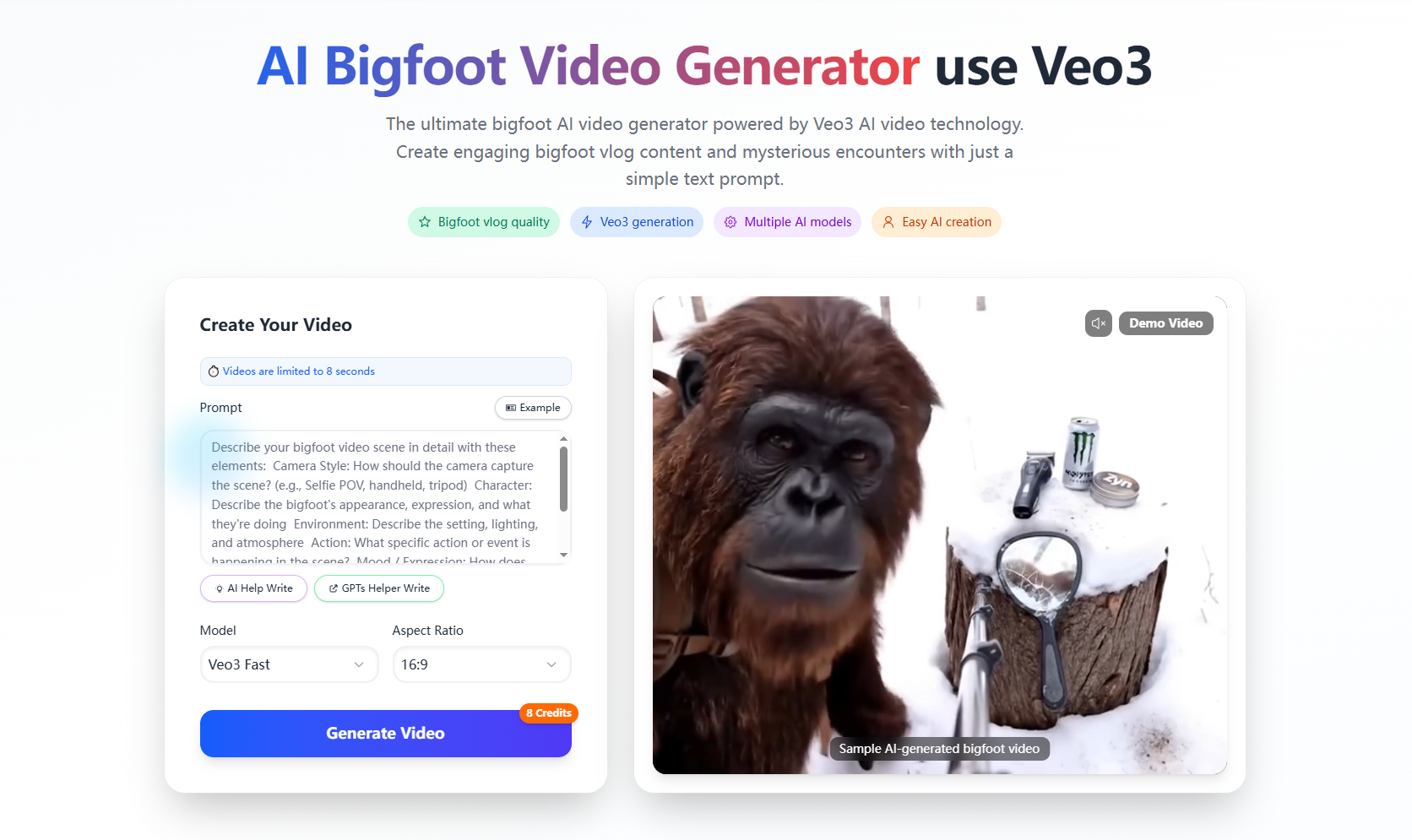
When I first discovered bigfoot as a content theme, I assumed it was reserved for nature documentaries or campfire stories. Then I found bigfoot video tools and the game changed. Thanks to BigfootVeo I realized that creating cinematic bigfoot video sequences is now accessible to any creator, not just big-budget productions.
Whether you’re a social creator chasing viral content, a storyteller building mythic narratives, or just someone curious about legendary creatures, bigfoot video creation with BigfootVeo offers huge potential. With sharp visuals, immersive atmosphere, and surprisingly intuitive workflows, it’s no longer just about “maybe Bigfoot exists” — it’s about showing what that could look like on screen.
What Makes BigfootVeo Special for Bigfoot Video Creation
BigfootVeo is an AI-powered platform focused on generating bigfoot video content. From text prompts or image inputs to full animated scenes, the tool makes bigfoot video creation surprisingly fast and cinematic. Some of the standout features include:
Dedicated creature-centric models: BigfootVeo specializes in the bigfoot character and narrative style, making your bigfoot video feel authentic rather than generic.
Text-to-video workflow: Instead of filming in remote forest locales, you simply type or upload, and BigfootVeo generates your bigfoot video scene.
Social-ready formats: BigfootVeo supports common ratios and short clips ideal for TikTok, Reels, or YouTube Shorts — perfect for bigfoot video virality.
Story + atmosphere built in: With prompts like “bigfoot walking through fog at dawn” or “bigfoot examining abandoned cabin,” you get mood, environment, and character all at once.
Accessible to beginners: No cost-heavy sets or actors required — just your imagination and the tool to make your bigfoot video come alive.
How to Create Your First Bigfoot Video
Here’s how I produced a quick bigfoot video using BigfootVeo:
Define your scene: I typed a prompt:
“Bigfoot emerges from dense pine forest at dawn, light mist swirling, camera shakes slightly as if a handheld phone, cinematic tone.”Upload or choose visual cues: I used a forest image for reference and selected a 16:9 ratio setting.
Generate: Through the BigfootVeo interface, I selected the bigfoot video generation model, set the length (~8 seconds), and clicked generate.
Edit prompt as needed: The first output had rigid motion, so I refined the prompt to include “slow steady camera tracking” and “soft morning light filtering through trees.”
Export and share: After one more render, I downloaded the clip, optimized it for 9:16 format, and uploaded it to my Instagram feed. The bigfoot video got more engagement than my usual posts.
Why Bigfoot Video Works Really Well on Social Platforms
Novelty factor: Viewers are drawn to mythic creatures—seeing bigfoot in a short video is unexpected and shareable.
Repeatable format: Because BigfootVeo makes bigfoot video creation efficient, you can produce a series (“Bigfoot in the Wild,” “Bigfoot Meets Urban World”) and build audience momentum.
Short-form friendly: Most bigfoot video clips on social are 5–10 seconds long. BigfootVeo’s format aligns perfectly with that trend.
Story & character built-in: The bigfoot video genre doesn’t need complex backstory—just visuals of a creature in an environment plus subtle motion gives curiosity and context.
Tips & Tricks to Make Stunning Bigfoot Videos
Focus on lighting & environment: Bigfoot videos look best in dramatic lighting—fog, dawn light, deep forest shadows.
Specify camera style: Prompts like “selfie stick POV” or “drone macro zoom out” make bigfoot video feel dynamic and cinematic.
Include subtle motion: Bigfoot walking, head turning, mist swirling—these micro-movements elevate bigfoot video beyond static scenes.
Optimize for platform: If your bigfoot video is for TikTok, render in 9:16 or square with an 8-second loop; ensure facial features and creature silhouette remain clear.
Iterate for consistency: If you’re producing a series of bigfoot video clips, keep one or two fixed prompt elements (e.g., “brown fur moss flecks,” “selfie-stick handheld”) to maintain creature recognition across videos.
Final Thoughts: Bring Bigfoot to Life
With BigfootVeo you’re not just creating a bigfoot video — you’re unlocking a creative world of myth, character, and visual storytelling. The combination of creature focus, intuitive AI workflow, and social-first design makes bigfoot video production surprisingly accessible.
If you’ve ever imagined bigfoot stepping out of the shadows, now you can make it move. Your next bigfoot video could be the one that captures imaginations, gets shared across platforms, and builds your creative identity.
So go ahead—visit BigfootVeo, type your prompt, generate your creature in motion, and share the myth in video form.
Your legend starts now.